Small-File Transfer Benchmark: rsync, tar, SFTP, TCP and QUIC
A small-file transfer benchmark across Germany and the US: 65,536 files, rsync, tar, snapshots, raw copies, TCP and QUIC, with 141 ms RTT.

I wanted to know what makes a directory of tiny files slow to copy. I tested rsync, streaming tar, snapshot replication and a raw image copy, then used a small Rust sender to vary the transport settings.
The payload was 65,536 files of 4,096 bytes: 268.4 MB, Germany → US, about 141 ms RTT. Both VMs had four vCPUs and 8 GB RAM. All methods used Btrfs loop volumes, preread sources, fresh destinations and no compression. Each configuration ran five times in shuffled order. Speeds count useful file bytes until the destination files are ready; sync and SHA-256 verification followed. Every completed copy passed.
I started with existing tools, using one data connection. Completed speeds are five-run medians:
| Method | Transfer speed (MB/s) |
|---|---|
| OpenSSH SFTP | <0.299* |
rsync (--whole-file) | 10.65 |
| Streaming tar through SSH | 10.05 |
| Btrfs full snapshot send | 10.84 |
| Full raw image copy | 1.71† |
SFTP hit the 15-minute limit in all five runs; its number is a completion-rate upper bound. †Raw sends eight times the useful payload. All tool observations and timing details.
One extra round trip per file would add 2.6 hours at this RTT. OpenSSH 9.6’s recursive SFTP client processes files sequentially, with pipelining inside a file. Tar sends an archive stream through SSH to another tar process, which extracts as bytes arrive. Rsync already pipelines across files. Bundling and pipelining both let later files move before earlier ones finish. These whole-tool measurements include other implementation differences, too.
Btrfs full send streams file data and filesystem operations. Our raw copy instead moved the entire 2.15 GB image, including unused space, to deliver 268.4 MB of files. Incremental snapshots and changed-block replication need an update-based test; we only measured full copies.
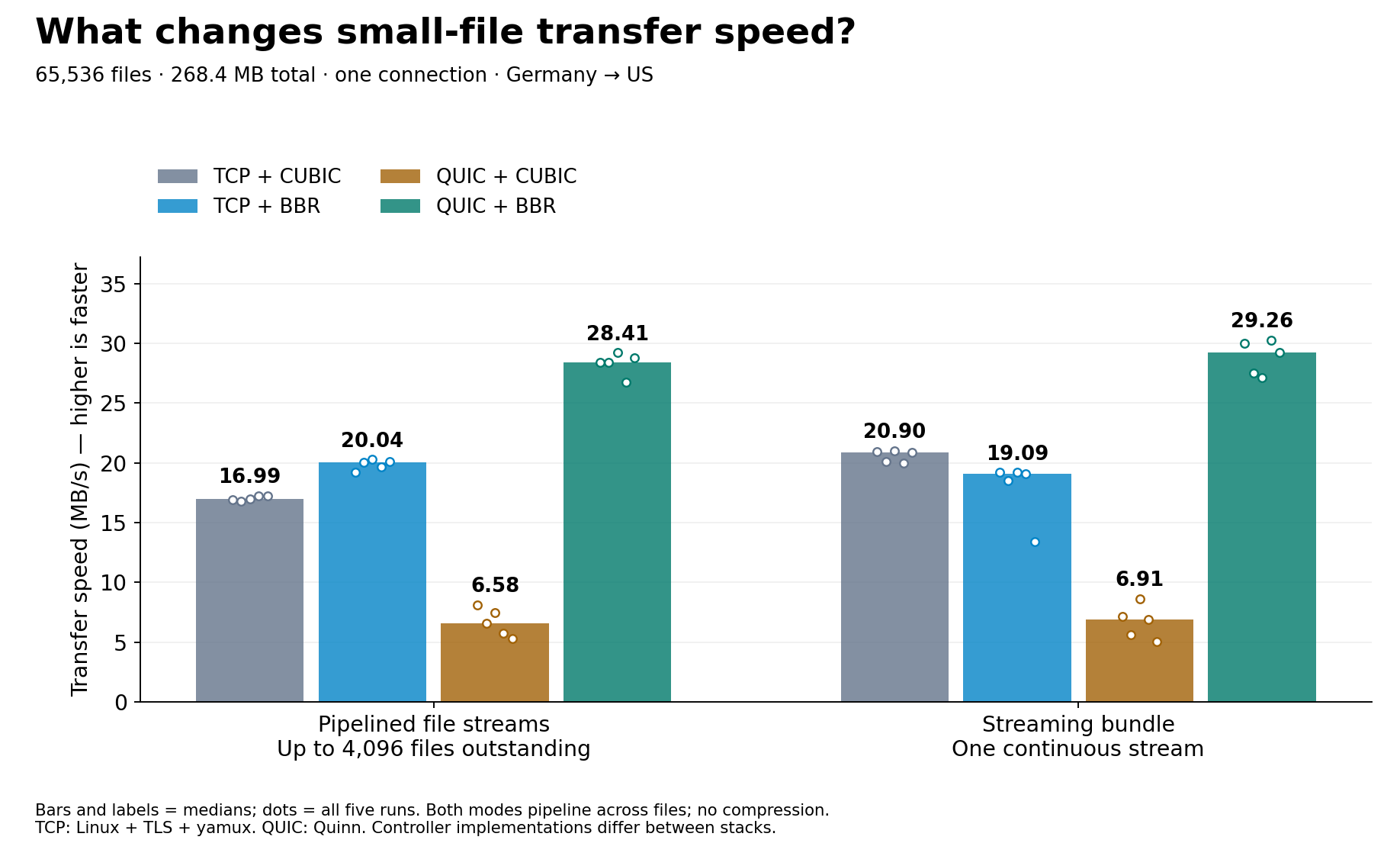
In a separate batch, the Rust sender shared file I/O code between Linux TCP/TLS/yamux and Quinn QUIC. One mode kept up to 4,096 file streams outstanding; the other bundled records into one continuous stream. Both sent across file boundaries without waiting for each file to finish.
Transfer speed (MB/s), one connection:
| File handling | TCP + CUBIC | TCP + BBR | QUIC + CUBIC | QUIC + BBR |
|---|---|---|---|---|
| Pipelined file streams | 16.99 | 20.04 | 6.58 | 28.41 |
| Streaming bundle | 20.90 | 19.09 | 6.91 | 29.26 |
Medians of five runs.
 Open the full-size chart
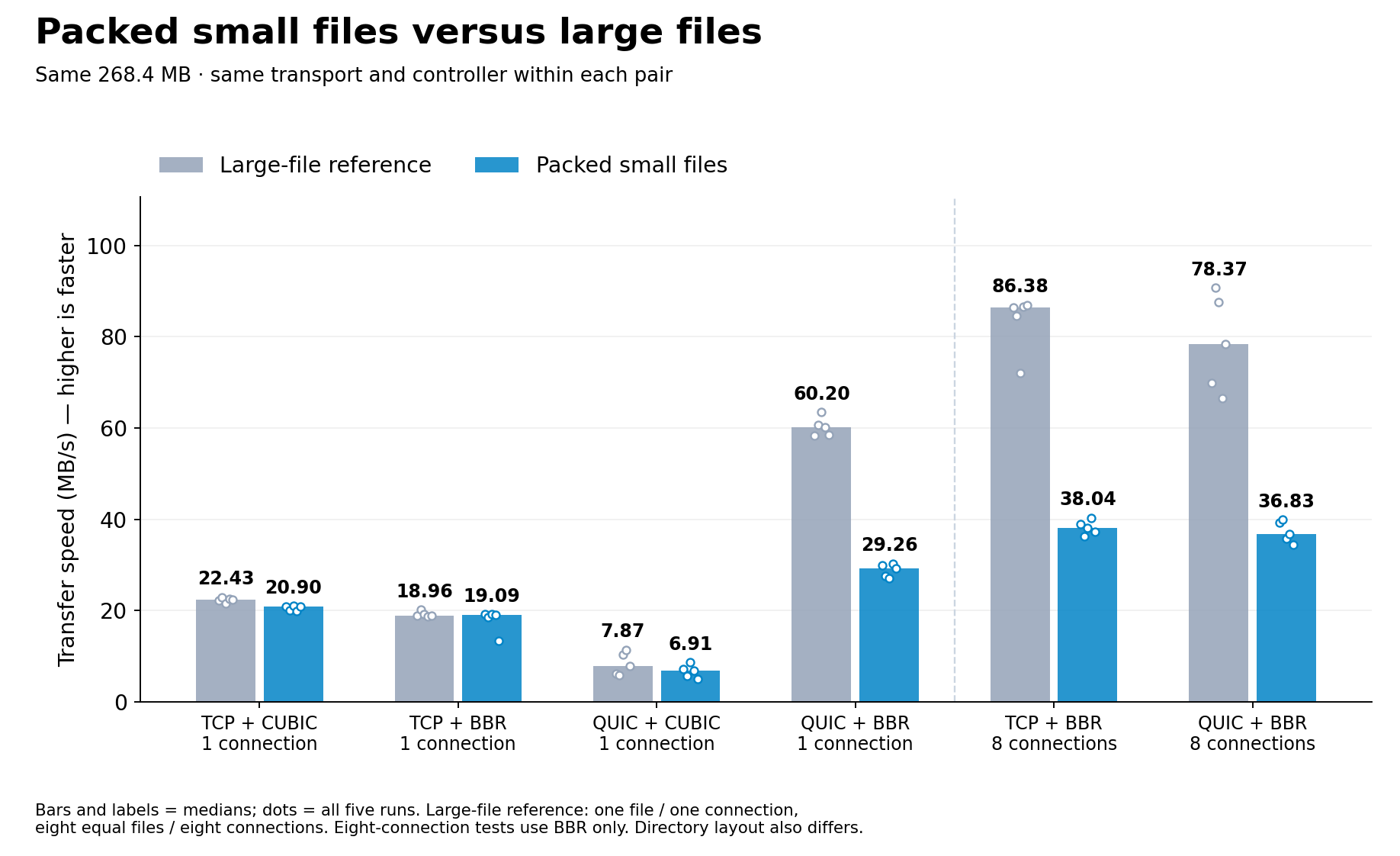
Changing CUBIC to BBR took bundled QUIC from 6.91 to 29.26 MB/s. The same change in TCP went from 20.90 to 19.09 MB/s. The TCP/QUIC ranking reversed with the controller; Linux and Quinn implement those controllers separately.
Eight independent BBR connections brought bundled small files to 38.04 MB/s over TCP and 36.83 MB/s over QUIC. This also increased reader/writer concurrency. Large files still went much faster:
 Open the full-size chart
The earlier tool batch includes a continuation after an SSH failure in another workload; all 80 Rust tests ran uninterrupted. These shared VMs showed UDP buffer errors and intermittent CPU steal. Different implementations and timing boundaries also prevent treating the two batches as an isolated transport comparison. Settings and audit.
I’d first check whether file boundaries make the sender wait, then test the congestion controller. Tar, rsync’s pipeline and a custom file pipeline all address the first problem. For our Quinn path, cross-file streaming plus BBR worked well. TCP didn’t get the same BBR benefit. Neither the protocol name nor the replication layer tells you whether those two things are working. To diagnose your own folder step by step, see why small file transfers are slow.
I work on WarpSend; that’s why I care about these details. This experiment used no WarpSend product code.
Tool results · All 80 Rust observations · Test code and method